

Article
Cross-industry
8 min read
A practical walkthrough of a Blue/Green major version upgrade: the prerequisites nobody tells you about, the failures I hit, and why Terraform makes you do part of this by hand.
By Stefan Cojocar, DevOps Engineer at EBS Integrator
the short version:
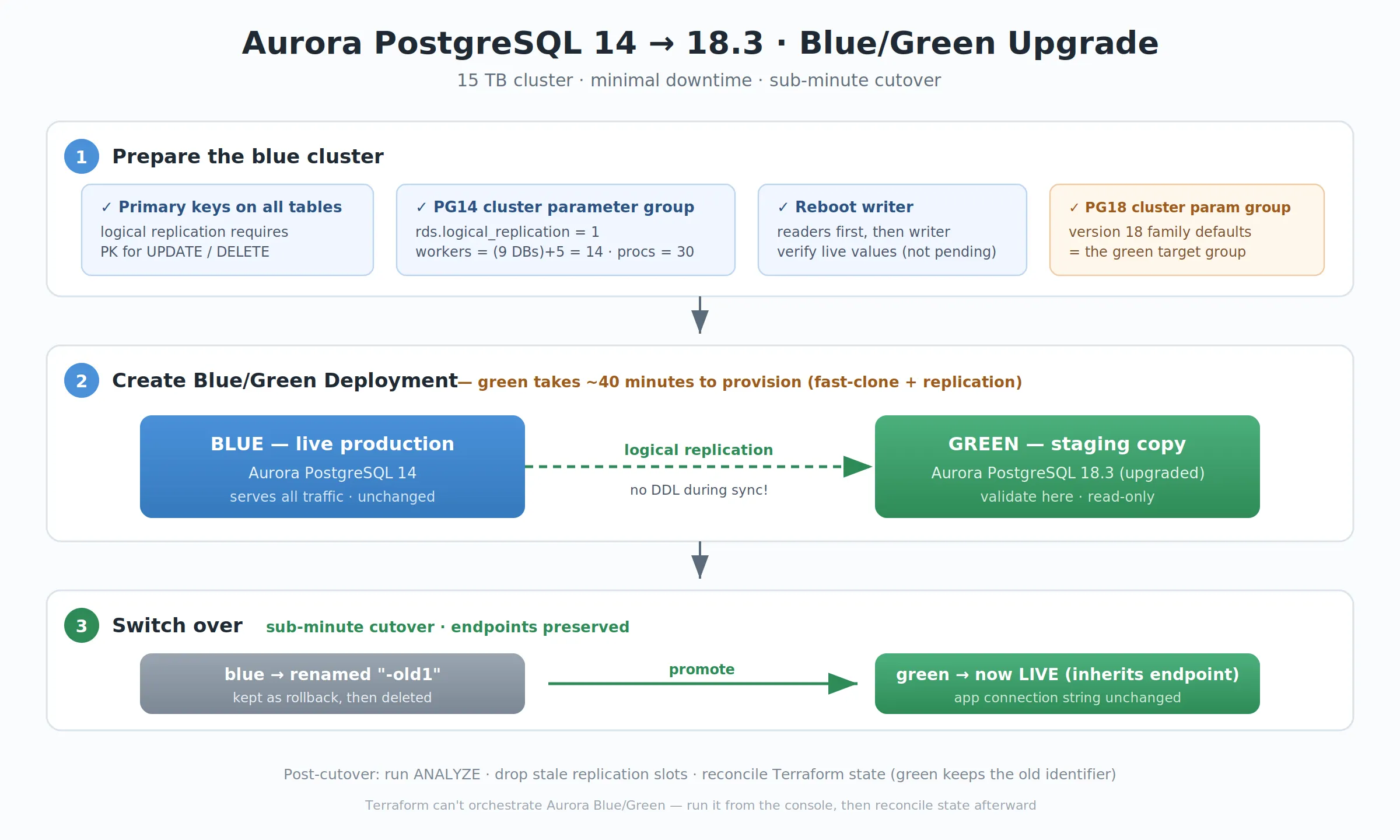
Data size doesn't drive Aurora upgrade time. Object count and the cutover window do: 15 TB meant only ~40 minutes of green-environment provisioning.
An RDS Blue/Green Deployment moved the cluster from PostgreSQL 14 to 18.3 with a sub-minute cutover and no connection string changes.
The prerequisites are the whole battle: a primary key on every table, two cluster parameter groups (one per major version family), and a verified writer reboot.
The worker math the wizard never explains:
max_logical_replication_workers= user databases + 5, andmax_worker_processesmust sit above workers + autovacuum + parallel workers.Terraform can't orchestrate Aurora Blue/Green. Run it from the console, then reconcile state; the endpoint and identifier inheritance keeps that manageable.
After switchover, ignore size metrics: copy-on-write makes VolumeBytesUsed read ~460 GB against 15 TB of real data. Verify with exact count(*) on both clusters.
Clean up both the deployment object and, after a safety window, the -old1 cluster. It bills until you do.
The problem
We had an Aurora PostgreSQL cluster stuck on version 14, holding roughly 15 TB of data, that needed to move to 18.3. Two things made me nervous going in:
The data size. 15 TB feels like it should mean a long, scary maintenance window.
Downtime. This is a production cluster. A long outage wasn't on the table.
The first fear turned out to be mostly unfounded, and understanding why is the first useful thing to internalize.
Data size barely matters for the upgrade time
Aurora separates compute from storage. Your terabytes live in the distributed storage layer, and a major version upgrade does not copy or rewrite that data. What actually drives upgrade time is the number of database objects (tables, indexes, schemas) that the upgrade machinery has to process, plus the reboot and the post-upgrade "cold stats" period, not the raw TB count.
So "I have 15 TB, this will take forever" is the wrong mental model. A cluster with a handful of huge tables upgrades faster than one with hundreds of thousands of small ones. The 15 TB itself is almost a non-factor in the upgrade clock.
That said, if downtime has to be near-zero regardless, the in-place upgrade's reboot window still isn't good enough. That's where Blue/Green Deployments come in.
Why Blue/Green (and one honest caveat about "zero downtime")
A Blue/Green Deployment spins up a full copy of your cluster (the green environment), upgrades it to the target version, and keeps it in sync with your live blue cluster via logical replication. When you're ready, you switch over: green is promoted, and it inherits blue's original endpoints so your application connection string never changes.
Let me be honest about the "zero downtime" framing, because you'll see it everywhere: it's minimal downtime, not literally zero. The switchover itself has a brief cutover window, typically under a minute, during which writes are paused. And, as you'll see below, you also reboot the blue cluster before the deployment to apply required parameters. Sub-minute cutover on a 15 TB production database is a fantastic result. Just don't promise your stakeholders a truly seamless, imperceptible switch and then eat a "well, actually" later.
The part nobody warns you about: PostgreSQL prerequisites
Here's where I lost the most time. For Aurora PostgreSQL, Blue/Green uses native logical replication under the hood, and logical replication has prerequisites that the console wizard does not hand-hold you through. My first several creation attempts failed on these.
1. Every table needs a primary key
PostgreSQL logical replication can't process UPDATE or DELETE on a table with no primary key. Find offenders before you start:
SELECT n.nspname AS schema, c.relname AS table
FROM pg_class c
JOIN pg_namespace n ON n.oid = c.relnamespace
WHERE c.relkind = 'r'
AND n.nspname NOT IN ('pg_catalog','information_schema')
AND NOT EXISTS (
SELECT 1 FROM pg_constraint con
WHERE con.conrelid = c.oid AND con.contype = 'p'
)
ORDER BY 1,2;
Add primary keys (or exclude those tables) before switchover, or replication will silently misbehave.
2. Two custom DB cluster parameter groups, one per major version
This is the big one, and it's where the "just one custom group" mental model bites you. You actually need two custom DB cluster parameter groups (not instance or DB parameter groups, and definitely not option groups: I wasted time in the wrong screen): A group on the version 14 family (aurora-postgresql14): attached to your existing blue cluster, with logical replication enabled and tuned. This is what lets blue act as the replication source.
A group on the version 14 family (aurora-postgresql14): attached to your existing blue cluster, with logical replication enabled and tuned. This is what lets blue act as the replication source.
A group on the version 18 family (aurora-postgresql18): supplied as the target parameter group for the new green cluster. Start it from the version 18 defaults; you don't strictly need the replication tuning here, but it must exist and be on the correct family. Parameter group families are tied to the major version, so a version 14 group is simply not valid for an 18 cluster, hence two groups.
My very first creation attempt failed for exactly this reason: I'd only prepared the blue-side group, and RDS rejected the deployment because I hadn't explicitly specified a version 18 target group.[1]
On the version 14 (blue) group, set these values:
rds.logical_replication = 1
synchronous_commit = on
max_replication_slots = 20
max_wal_senders = 20
max_logical_replication_workers = 14
max_worker_processes = 30
The two that actually caused my failures were max_logical_replication_workers and max_worker_processes, because of a dependency the wizard never explains.
The formulas behind those numbers
Don't copy my numbers blindly: they come from formulas that depend on your cluster. Here's how each value is derived:
max_logical_replication_workers = (number of user databases) + 5. Count your user databases with SELECT count(*) FROM pg_database WHERE datistemplate = false; (this includes Aurora's internal rdsadmin, so subtract system DBs if you want to be precise, though erring high is cheap and safe). I had 9, so 9 + 5 = 14. The "+5" is the reserve for table-sync and apply workers that AWS Support hands out; it's not obvious from the docs.
max_worker_processes ≥ max_logical_replication_workers + autovacuum_max_workers + max_parallel_workers. This is the constraint that was actually failing me. The error blamed max_logical_replication_workers, but the real problem was max_worker_processes being too low to sit above it.
In my case: autovacuum_max_workers = 3, max_parallel_workers = 8, max_worker_processes = 8 (the default). So the minimum was 14 + 3 + 8 = 25, and I set it to 30 for headroom. That default of 8, by the way, is computed by Aurora as GREATEST(vCPU × 2, 8). That is exactly why a smaller instance class lands on 8, and exactly why it was too low for logical replication.
max_replication_slots: at least your planned total of logical replication publications/subscriptions (plus any DMS CDC tasks). For a Blue/Green upgrade the active count is small; 20 gives comfortable room.
max_wal_senders: at least the number of active slots; recommended slightly higher than max_replication_slots. I mirrored it at 20. So max_worker_processes = 30 comfortably covers 14 + 3 + 8 = 25 with headroom. That's the config that finally passed the prerequisite check.
3. Reboot the writer, and verify it took
Most of these parameters are static: they only take effect after a reboot. And Blue/Green specifically requires the writer instance to be in sync with the cluster parameter group, or creation fails.
Aurora doesn't reboot "as a cluster": you reboot instances. Do readers first, then the writer (a full stop/start also works and applies the params on start, but it's slower and overkill just for a parameter change).
Then verify the live values, because this is the trap: if you skip the reboot or the writer hasn't picked up the group, the running cluster still reports the old values and creation keeps failing.
SELECT name, setting FROM pg_settings
WHERE name IN (
'rds.logical_replication','synchronous_commit',
'max_replication_slots','max_wal_senders',
'max_logical_replication_workers','max_worker_processes'
);
You want to see 14 and 30 live, not "pending."
Creating the deployment and switching over
Once the prerequisites were genuinely satisfied:
RDS → Databases → select the cluster → Actions → Create Blue/Green Deployment.
Set the target engine version (18.3) and supply the version 18 target parameter group you created earlier. Remember: this is the second of your two groups. It must be on the aurora-postgresql18 family, separate from the version 14 group tuned on blue.
Wait for provisioning. Green comes up already upgraded, replicating from blue. For our 15 TB cluster, creating the green replica took around 40 minutes. AWS fast-clones the storage (copy-on-write, so it's far quicker than a full data copy) and then establishes replication. Plan for this to be a coffee-and-come-back step, not instant.
Validate against the green endpoints. Run your critical queries, confirm extensions load, check SELECT version(); shows 18.3. Reads and validation only: don't write to green.
Run ANALYZE to refresh the pg_statistics table. AWS explicitly recommends this as part of the switchover process. Optimizer statistics are not carried across a major version upgrade, so without it the new cluster runs with empty planner stats and you'll hit slow queries and performance issues right after cutover. Don't skip it.
Switch over when replication lag is near zero and no long-running transactions are open on blue. Pick a low-traffic window. The switchover renames endpoints so green inherits blue's original names, and blue is renamed with an -old1 suffix. Cutover was sub-minute. Application connection strings didn't change.
The pattern isn't unique to one lender. Publicly documented tier-one deployments show the same convergence: what reaches production and survives is the tightly scoped, verifiable build, not the everything-at-once platform.
Watch out during the sync window
No DDL on blue while replication is active. Any schema change, including hidden DDL from ORMs running migrations automatically, can break the deployment and force you to recreate it. Freeze migrations for the whole window.
Sequences sync at switchover. With many databases, that can add time to the cutover. Don't set the switchover timeout too tight.
Materialized views aren't refreshed on green automatically. Refresh them manually after switchover if you rely on them.
Large objects (pg_largeobject) aren't replicated. If you use them, that data won't be on green.
The Terraform reality
Our cluster was managed in Terraform, and this is worth spelling out because it surprised me.
The Terraform AWS provider cannot orchestrate a Blue/Green Deployment for an Aurora cluster. The provider's built-in blue_green_update support exists only for the standalone aws_db_instance resource. An Aurora cluster is modeled as an aws_rds_cluster plus one or more aws_rds_cluster_instance resources, and because the Blue/Green orchestration object spans all of them, the provider can't treat it as a single self-contained resource. So for Aurora, you run the Blue/Green from the console: there's no clean terraform apply path.
Here's the good news that made the state reconciliation easier than I feared: after switchover, the green cluster adopts the old cluster's identity, meaning its endpoint and the original cluster identifier. Because Terraform tracks the cluster by that identifier, the live cluster is still largely recognizable to your state. In practice the reconciliation came down to updating the config to the new engine version and the new parameter group, then running terraform plan down to a zero diff, rather than a full state rm + re-import of everything. (The cluster instances are the fiddly part, since those are new underlying resources; check whether they reconcile cleanly or need an import.)
The takeaway: Terraform can't drive the upgrade, but the endpoint-and-identifier inheritance means it doesn't fight you too hard afterward either.
The storage numbers will confuse you (copy-on-write)
This deserves its own section because it nearly sent me into a full recovery panic, and it's the least intuitive part of the whole process.
After switchover, I looked at the new cluster's storage metrics and saw numbers that seemed to say my data was gone:
\l+ / pg_database_size reported ~15 TB (the real logical size)
CloudWatch VolumeBytesUsed reported ~460 GB
The snapshot was ~435 GB
Three numbers, wildly inconsistent. It's tempting to conclude the physical storage figures mean the data never made it across. They don't. Here's what's actually going on.
Amazon Aurora creates the green environment by cloning the underlying Aurora storage volume of the blue environment. Cloning uses a copy-on-write protocol: the green cluster initially shares the same physical data pages as blue rather than copying them. The green cluster volume only stores the incremental changes made to the green environment. So VolumeBytesUsed on green reflects only the pages green owns (the ones written or modified since the clone), not the full logical dataset. That is why it reads ~460 GB while the data is genuinely all there and readable. The snapshot is small for the same reason: it backs up green's owned physical volume, not the shared pages.
The number that actually tells you the truth about data presence is the logical size (pg_database_size). Better yet, exact row counts. VolumeBytesUsed and snapshot size are measuring physical page ownership, not logical content. Don't read them as a data-integrity signal.
The key consequence for cleanup: when you delete the DB cluster in the blue environment, the size of the underlying Aurora storage volume in the green environment grows to the full size. Aurora redistributes ownership of the previously-shared pages to green (the remaining clone), so green's VolumeBytesUsed climbs from ~460 GB up toward the full ~15 TB, and its snapshots grow correspondingly. This is not data being copied or added: it's the same pages you always had, now owned by green instead of shared. Your storage billing consolidates onto green at that point too.
Because that redistribution is real storage-layer work on a multi-terabyte volume, I'd delete the blue cluster during a low-traffic window and watch ReadLatency/WriteLatency and DiskQueueDepth while it settles. It's designed to be non-disruptive and needs no downtime, but on a busy 15 TB cluster you want fewer users around if there's any transient latency, and you don't want it overlapping other heavy I/O like backup jobs.
Verify with row counts, not sizes
The single most useful thing I learned: the switchover's green checkmarks and low replication lag do not guarantee the initial copy finished for your biggest tables. At one point mid-process I saw my largest table reporting 17 million rows when it should have had 30 billion. The initial copy was still running, and the dashboard looked perfectly healthy. It caught up later, but the scare was real.
Every size-based metric can mislead you: pg_database_size and n_live_tup read from catalog metadata (which can be stale after a major upgrade), and VolumeBytesUsed/snapshot size measure page ownership (which copy-on-write makes tiny). When they disagree, and mine disagreed by 30x, the only thing that settles it is an exact count(*) on both clusters:
SELECT count(*) FROM users_location_archived;
It's slow on a billion-row table, but it physically walks the heap: it cannot return a count for rows that aren't there. When my old (PG14) and new (PG18) clusters returned the identical count to the row, that was the definitive proof the upgrade was complete. No dashboard, size figure, or status badge can substitute for it.
Cleanup: don't skip this, it bills
After switchover, AWS itself recommends deleting the Blue/Green deployment. There are two separate deletions:
Delete the Blue/Green deployment object. After a successful switchover, this no longer offers to delete your clusters (it did during my earlier failed attempts, pre-switchover): it only removes the orchestration wrapper. Both clusters survive.
Delete the old (-old1) cluster separately when you're confident. Give it a day or two as a rollback safety net first. You can even stop it to cut compute cost while keeping it as a fallback. When ready: delete its instances first, then the cluster, taking a final snapshot.
One gotcha on the old-cluster delete: if deletion protection is enabled (common on Terraform-managed prod, and it rides along to the -old1 copy), you have to turn that off before it'll delete.
Lessons I'd tell my past self
Data size isn't the enemy: object count and the cutover window are. 15 TB didn't mean a long upgrade; it just meant the green replica took about 40 min to provision.
The prerequisites are the whole battle. Primary keys, two correctly-familied cluster parameter groups (one per major version), and a verified writer reboot. Get these right and creation just works; get them wrong and you'll burn an afternoon on cryptic "incompatible parameter" errors.
You need two parameter groups, not one: a version 14 group on blue (with replication tuned) and a version 18 group as the green target. A group from the wrong major-version family is silently invalid.
Memorize the worker math: max_logical_replication_workers = (databases) + 5, and max_worker_processes ≥ workers + autovacuum_max_workers + max_parallel_workers.
Always verify live parameter values after reboot. "Pending" isn't "applied."
Freeze DDL during replication. Watch your ORMs.
Terraform can't orchestrate Aurora Blue/Green, but the post-switchover identifier inheritance keeps state reconciliation manageable.
Minimal downtime, a 15 TB cluster, major version jump from 14 to 18.3. Worth the setup once you know where the landmines are.
Originally published as Upgrading a 15 TB Aurora PostgreSQL cluster on Medium.
Reference
- Cojocar, Stefan. "Upgrading a 15 TB Aurora PostgreSQL Cluster from 14 to 18.3 with Minimal Downtime." Medium, 21 July 2026. ↑
Share this article on:
More insights
Article
Cross-industry
AI Consulting
Data Engineering & Analytics
9 min read
What AI sprawl is, why its return stays invisible, and four moves to control it with the people you have. Level 2 of the EBS AI-maturity ladder.

Article
FinTech
AI Consulting
Data Engineering & Analytics
Regulatory & Compliance
5 min read
AI in fintech is everywhere, yet few systems would survive an audit. Why projects stall, what regulators expect, and the three steps that fix it.

Article
EdTech
Systems Integration
Data Engineering & Analytics
11 min read
Legacy administrative platforms across European education institutions were procured separately with no shared architecture, creating education data silos that force daily manual reconciliation, while 70% of IT capacity is consumed maintaining these systems.

Article
Retail & eCommerce
Data Engineering & Analytics
AI Consulting
8 min read
Big Data is changing the retail industry. (internal expertise) Learn how businesses use data to make smarter decisions, create personalized experiences, and improve customer service with real examples of BigData applied to today’s fast-moving market.

Article
Cross-industry
Cloud & DevOps
Process Automation
5 min read
From banking to public services, systems don’t fail because of bad code—they fail because of bad delivery. This article shows how EBS Integrator uses DevOps to make deployments predictable, recover in minutes, and scale without chaos. Includes real case studies, expert insights, and a look at the next wave of DevOps—AI, serverless, edge computing, and hybrid cloud.

Article
Retail & eCommerce
AI Consulting
Data Engineering & Analytics
6 min read
Find out how technology-driven personalization x AI creates closer relationships with customers.

Article
Retail & eCommerce
Data Engineering & Analytics
AI Consulting
6 min read
Reach customers wherever they shop with AI and real-time data. Discover how targeted marketing, a seamless online and offline shopping experience, and predictive analytics can personalize recommendations and boost sales. Our retail expert, Olga, shares practical insights and strategies to help you take your store digital. Read the full article for actionable tips and real-world examples.

Article
Retail & eCommerce
Business Strategy
Digital Transformation
Data Engineering & Analytics
7 min read
Learn about personalized customer experiences, data-driven decision-making, omnichannel approaches, AI/AR and real stories of how we help businesses implement new business models.

Article
Cross-industry
Cloud & DevOps
Data Engineering & Analytics
IT Consulting
9 min read
Data storage has evolved from paper/floppy disks to cloud tech. See through our experts' experience what cloud migration is, how can you use it for your business and what you get from migrating your data to the cloud.
Article
Cross-industry
Programming Languages
Data Engineering & Analytics
7 min read
The world of Data Sciences’ is an ever-changing place, new applications and requirements appear on a daily basis. With all that, a professional SQL-guru who can optimize their interactions with databases is valued in his weight in gold. Luckily for us we have just such master. In this post we hope to explore the world of ORMs (particularely Django ORM vs SQL Alchemy) with our Python specialist and get his opinion on which he prefers! And provide some nifty examples to boot.

Article
Cross-industry
Data Engineering & Analytics
Software Development
7 min read
Peeling this BASICs digital onion, we’ve left some details out (particularly in our last article). As stated, data-centric and data-driven applications deserve their series, a journey we’re kicking off today. Before talking about BigData, strategies and mechanics, let’s filter the messy data-centric vs data-driven dilemma.