
Article
Cross-industry
9 min read
AI licenses have been bought and you have already trained your people, yet a few weeks later most of them stopped using the tool. Even more, your reports can't show you which team's work actually got better.
EBS Integrator AI-maturity series · Level 3 → 4
the short version:
Pay for AI licenses (seats) only where a team uses them every week for a named job. Then show finance how that job changed. We call this solo tasks, shared steps. Work one person does alone gets better as soon as they have the tool. Work that passes between people gets better only when one of its steps is changed to use what the AI produces. So:
Pick one weekly procedure (a routine piece of work) on one team. Decide what to measure: how long one run takes (run time), errors, or both.
The team lead writes down today's numbers (the baseline) from the team's own records, then adds one line each week.
The department head changes one step so it uses what the AI produces.
Each month, you check use per team, never per person.
At the renewal, you give the licenses to people who use them on a named job. And you show the before and after.
Why does AI use drift back after the rollout?
Because nothing in people's week asks for the tool. The rollout (licenses handed out, a training course) gets people to try it. Then the novelty wears off, and people go back to the old way of working (writing the weekly report from scratch, as they always did). Whether use lasts depends more on the company than on the person.
You are not alone in this. Microsoft tested it in 66 large firms in 2023 and 2024. In each firm, a lottery chose which office workers got Copilot, Microsoft's AI assistant in Outlook, Word and Teams. In all, 3,684 of 7,137 people got it. Microsoft's logs then showed who used it each week.
In the first weeks, 55% of them used it in a given week. From week 12, just under 40% did. By months 4 to 6, only 5% used it every week, and 20% never used it at all. The firms chose to join the test, so they are not a fair cross-section of all companies.
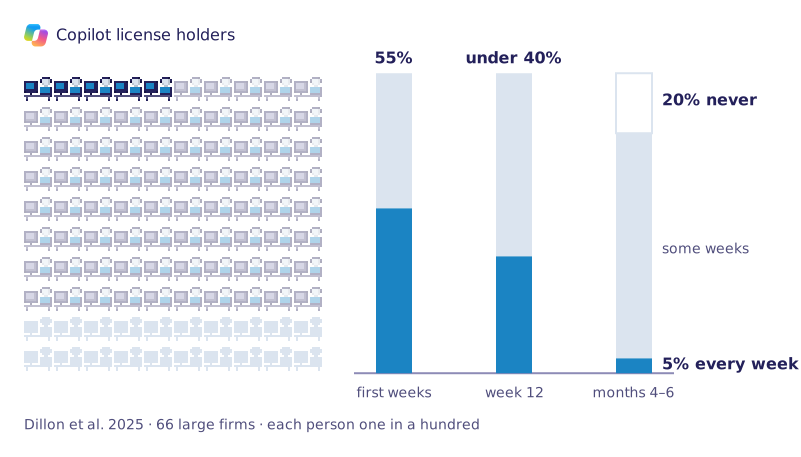
100 Copilot license holders over time, 66 large firms.[1]
Your usage report can still look fine for months. It counts "active users": anyone who used the tool at least once in the period. So one quick question a week (asking it to reword a single email) counts, even when the tool is no longer part of the real work.
So the training and the champions (colleagues picked to promote the tool) were not the mistake. Many companies did exactly that, and use still went down.
What was missing was around the tool: a named task, someone who expects it, and someone who owns the result. A named task is one job that comes back every week, like the Friday status report, the monthly supplier review or the first reply to a customer complaint. A manager asks for it to be done with the AI.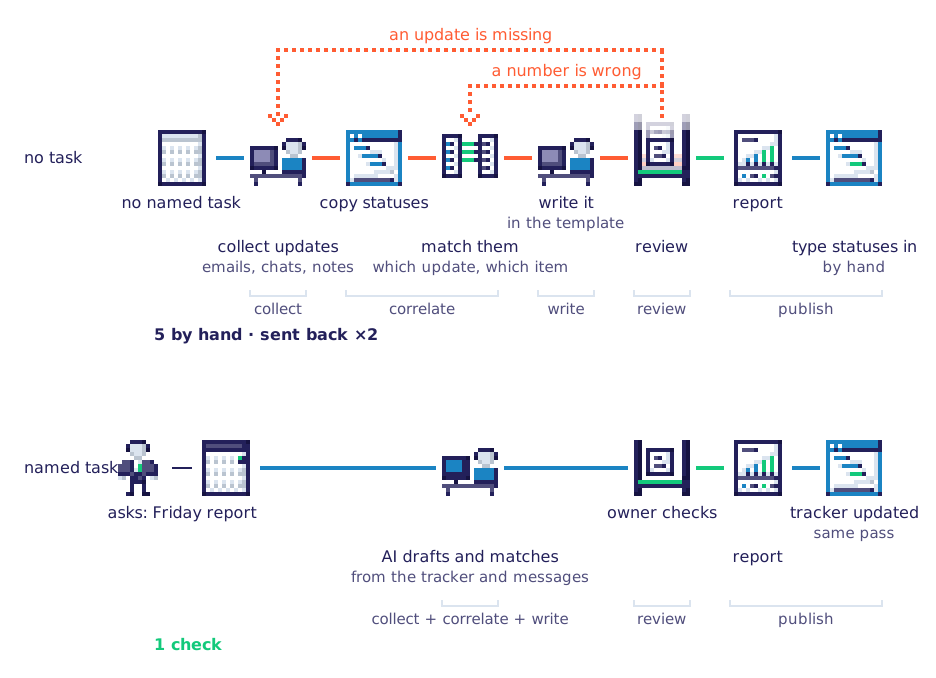 A named task that comes back every week.
IT owns the contract. The leader who pushed for the tool owns the promised results. In most companies, nobody owns the daily work: nobody checks whether the Friday report is now drafted with AI, or still by hand.
The EBS AI-maturity ladder is our eight-level scale of how far a company has got with AI, from first experiments to AI that runs whole tasks. Level 3 is called Teams trained unevenly: everyone has a license and had training, but use dropped, and nobody can see which team's work changed.
At level 4, you see use per team every month, and one routine procedure has AI inside one step. At level 3, "the sales team uses ChatGPT to write emails". At level 4, every new request for a proposal passes through a set AI step (the AI drafts the scope from the client's request, and a person checks it), and the time to scope it is measured from the tickets.
level | where you stand | seen from level 3 |
|---|---|---|
3 · Teams trained unevenly | you are here ✓ | everyone has a license and had training; use peaked in the first weeks and settled lower; solo tasks held, shared work didn't move, and nobody can see which team's work changed |
4 · Routine work on AI | Next, within reach | use you can see per team every month; one routine procedure with AI inside a step, measured before and after; seats that follow named use |
Levels 5 to 8 build on the one before. Full ladder on the AI-maturity page.
Will a better tool, cleaner data or more training bring use back?
Not on their own. A slow tool loses people in the first weeks, and messy data makes the answers worse. Training gets people to try the tool, but none of these makes them keep using it. What does is a manager who asks for the tool on a named task, and checks the result.
The same tool can last in one company and fade in the next. In the same Microsoft test, weekly use over months 4 to 6 was 6.3% at the lowest firm and 70% at the highest.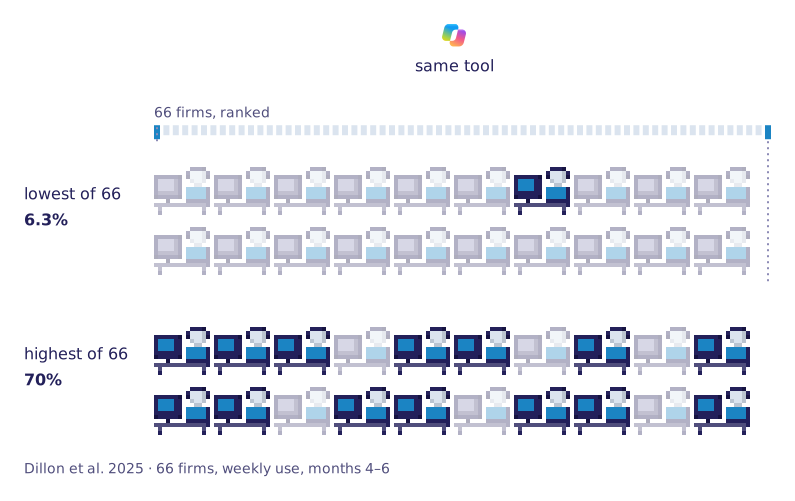 Being asked by the employer matters more than a a training.
In January and February 2026, five researchers surveyed about 3,000 working adults in each of seven countries. The countries were the US, the UK, Germany, France, Italy, the Netherlands and Sweden. They asked if the employer encouraged AI (for example, a manager saying "draft it with AI first, then we review"), gave AI tools, or trained people.
Among people with no training and no tools, 47% used AI at work when the employer encouraged it, and only 10% when it did not. Tools alone helped less: 21% against 10%. Once encouragement and tools were counted, training made no difference. The survey saw these things together; it did not prove which causes which.[2]
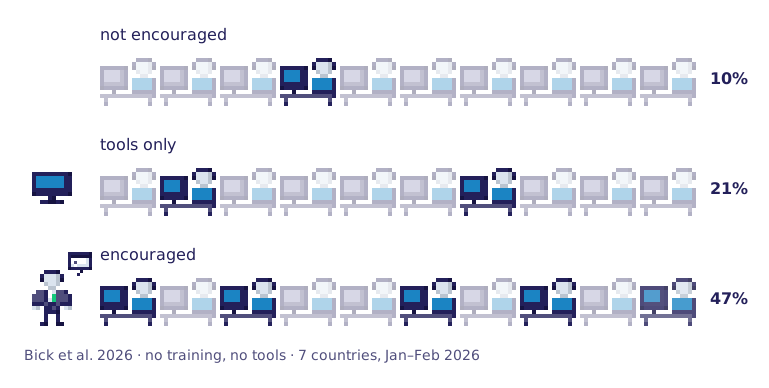 So ask your managers to request it. Each manager decides what their team's week is for, and a team will continue to use the tool if their lead requests it for a specific task.
A new training session will not solve this issue; it simply repeats the initial set-up. What helps is seeing the tool in action on your own task. First, name the task, then let a colleague demonstrate it on a real project.
Some people want AI, just not the tool you bought, because one tool rarely fits every job.
Say you gave everyone Microsoft 365 Copilot. A project manager keeps using ChatGPT, because it is the tool they know for structuring ideas. A marketer uses Gemini's image model (known as Nano Banana) to make pictures for articles. Both pay on a personal card and paste in company texts, without telling IT.
When the tool everyone got does not match what each team needs, people find their own, and you lose sight of where your data goes.
So before the renewal, ask each team which job they need AI for, and which tool they already use for it. That is shadow AI, level 1 of this series: AI used outside the company's control.
What makes AI use hold in a team?
Use holds when the AI is part of one clear step of the work, and someone measures it. At EBS we call this solo tasks, shared steps. For work one person does alone, having the tool is enough. Work that passes between people only moves faster when one step is rebuilt around the AI.
? | solo tasks | shared steps |
|---|---|---|
What it is | work that starts and ends with one person | one stop in work that passes between people |
What keeps use going | access and a habit | a step in the procedure built around what the AI produces |
What you measure | activity | how long the procedure takes, and its errors |
Take a solo task first. A sales manager prepares for a client call. Before, they read the client's last emails one by one and copied the key points into notes by hand. With AI, the same steps run in order: the emails go in, a summary comes out in the same format every time, and they check it. Nobody else is involved, so the time saved is theirs to keep.
Now a shared step. A project manager drafts the weekly status report with AI, much faster. But it still waits for the team lead to check it and the department head to approve it. Then someone copies it into the tracker (the team's shared task list). The report arrives on the same day as before.
When the time a person saves is lost in the next step, nobody sees a reason to keep going. That is why use holds in solo tasks and fades in shared work, until one step is rebuilt.
Rebuilt, the same steps run in one go.
If use is fading in your company, it is not a sign that people are bad with technology. It happens to software developers too, and more than half of them use AI (in the survey above, computer and maths workers, in every country).
Three researchers followed more than 500,000 developers on GitHub (a site where developers keep their code) from 2022 to 2026. They compared developers who started using AI coding tools with similar developers who had not started yet.
With AI, developers saved up to 240% more code. But releases, the finished versions that reach customers, rose by only 30%.[3]
Here is why. The AI writes code faster. But people still check, test and release every change at the old speed, so the extra code waits in front of them.
Researchers call this the weak link, or the bottleneck: the slowest step sets the pace. A usage report counts the drafts; the business feels the releases.
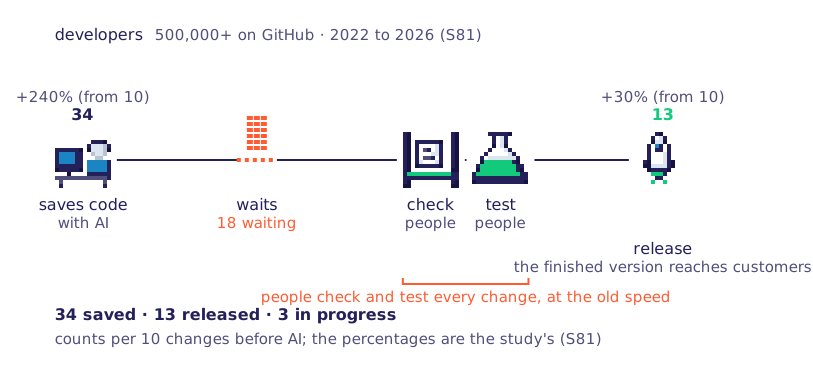 Appearances can be deceptive. What seems slow is actually setting the pace, not the other way around.
Put AI on the fastest step and nothing changes; cut the steps that move information around and the process is rethought
says Vitalie Aremescu, Founder of EBS Integrator.
From this perspective an offer (a price proposal for a client) still goes through five to seven screens after the AI has written it.
How do you see which teams use it, without watching people?
Use the admin reports you already pay for (the usage pages in the tool's settings), and read them per team, never per person. Choose the smallest team size the report allows. These reports count logins, not whether the work changed. So for the one procedure you are changing, also keep a starting number and a weekly team log.
What do the admin reports show per team?
Only some show teams, and none shows whether the work changed. Microsoft's admin report counts people and apps. Its Copilot Dashboard (a usage view in Viva Insights, Microsoft's workplace analytics) adds teams above a minimum size. ChatGPT Enterprise groups people by your company directory.
All three count logins and clicks, not time or errors.
product | per team | smallest group shown | where it stops |
|---|---|---|---|
Microsoft 365 admin center, Copilot usage report | no team view; per person and per app, names hidden by default | — | activity only, over 7 to 180 days |
Copilot Dashboard in Viva Insights | by manager, department or a field uploaded from HR; group data needs at least 50 licenses | 10 by default, 5 at the lowest | "assisted hours" is an estimate, built from action counts and meeting length |
ChatGPT Enterprise workspace analytics | by SCIM group (groups copied from your company directory); the user export includes names and emails | groups under 10 hidden in task insights | impact only from a survey that OpenAI says does not show cause and effect |
Every export lists people by name, so reading per team is your choice.
What should you measure instead?
Measure the work, not the person. The work's performance metrics are simple: how long one run takes (its cycle time), and how many errors it has. Before you change anything, take both from the team's own records, so you have a starting number to compare with.
If the work runs in a ticket system (the tool where requests are logged and closed, like a helpdesk), take the times from there. If another system logs it, like finance for invoices, ask IT for an export. If it leaves no record, use a simple sheet. The starting numbers sit at the top, then one row a week: the date, the run time, the errors and what went wrong.
Measure the work, not the person.
Also save the usage data now. The reports only keep it for a limited time, and you will want it at the renewal.
Why per team?
Watching each person raises stress and does not improve their work. And when a usage number becomes a target, people find ways to game it. Economists call this Goodhart's law.
How do you rebuild one procedure so the AI sits inside it?
Pick one weekly procedure whose result someone checks, and change it so one step runs on what the AI produces. This is where AI implementation challenges become concrete: one step, one owner, one measure. You choose the measure, the department head changes the step, and the team runs it and logs it.
1. Choose a procedure worth measuring
One team, one job that runs weekly, like matching invoices in finance, onboarding a new hire in HR or answering first-line support tickets. Its result is easy to check, and its mistakes are caught before a client sees them. Measure the time, the errors, or both.
2. Write down the starting numbers
The team lead takes them from the team's records before anything changes. From then on, the weekly log is theirs.
3. Change one step to use the AI
The department head picks the step and writes the new version down: the steps in order, with who does each. They also remove steps that only move information around (retyping numbers from an email into the tracker, or sending the same file for a second approval). Some steps get worse with AI (a judgment call the AI gets confidently wrong), so let the numbers decide.
Check that people can use the AI inside the system where the work happens, not by copying and pasting between windows. And before a step uses client or financial data, tell the team in writing what data may go into the AI and what may not.
4. Add one line every week
The team logs the time, the errors and what went wrong. Expect the first weeks to be slower. Economists call this the J-curve: on a chart, results dip first and then climb above where they started, because a new way of working costs time before it saves time. The written procedure and the log help the team through it.
5. Check once a month, per team
The admin report shows how many people used the tool; the log shows what changed. Start with one procedure on purpose: it is your pilot. Once it shows a measured change, the next team copies the written procedure instead of starting from zero.
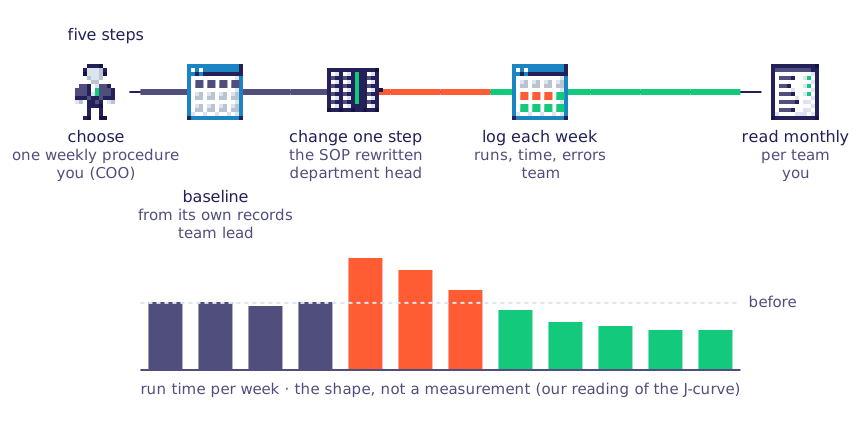
Slower at first, then faster than before.
We did this ourselves for our business analysis work. We split the analyst's week into 34 jobs. Each got its own AI skill: written instructions for that one job, with a clear input, output and quality check. The analyst checks every result before the next step. Average development hours per project fell from 500 to 150. (the case)
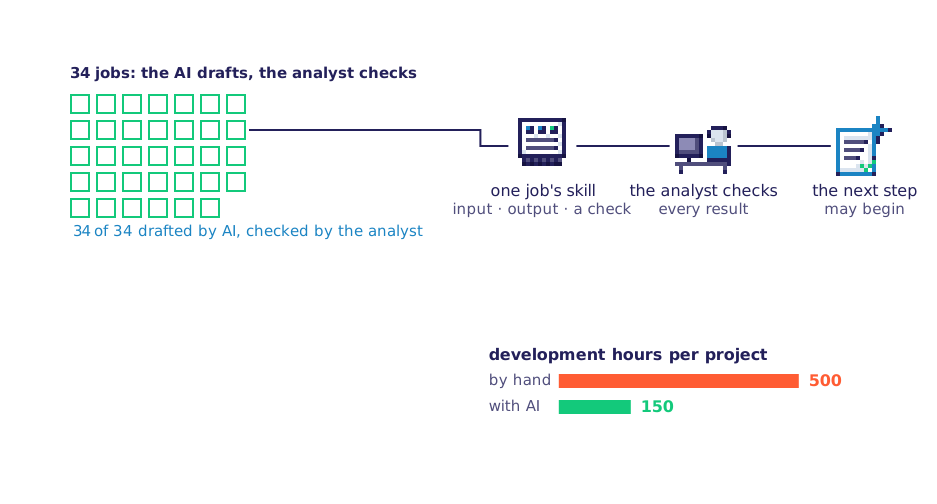
How do you prove you've reached level 4 before the renewal?
You have left level 3 when one routine procedure runs with AI inside it, measured before and after, and you can see use per team every month. At the renewal, bring both to finance: licenses that follow real use, and one procedure's measured change. That answers "where did the productivity go?" with your own numbers.
At one company's support desk, an AI assistant suggested replies during each chat. Across 5,179 agents, problems solved per hour rose by about 14%, most for new agents. Time per chat fell by 9%.[4] This is the vendor's own data. Your baseline and weekly log give you the same kind of number for your own work.
Some licenses will sit unused. Before you cut one, ask why: does that person have no named task, or did nobody show them how it fits their work?
A field technician who rarely sits at a computer may not need a license. An accountant who never saw it used on a reconciliation may need ten minutes with a colleague. Then make it the rule, which also gives managers a reason to take part: a team keeps its licenses when it names one weekly task and its starting numbers.
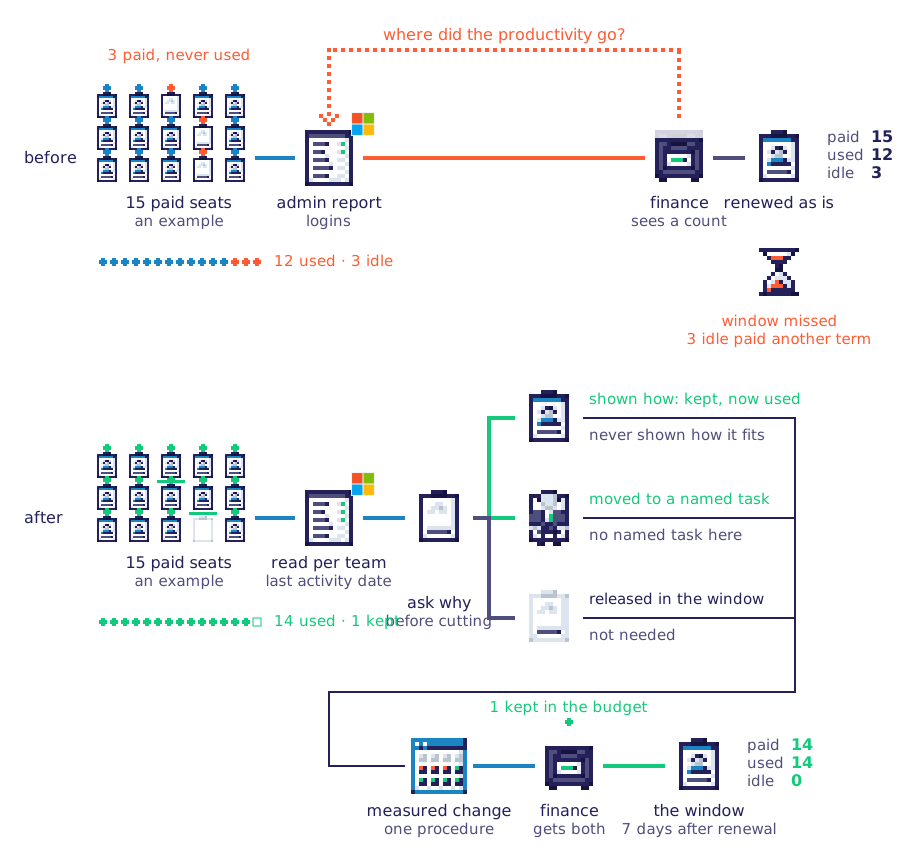
Licenses that follow real use.
Get this ready before the renewal date, because most vendors only let you cut licenses at fixed times (on a yearly plan, usually only when the year ends).
If the renewal is only weeks away, you won't have a measured procedure yet. Renew the licenses people use every week on a named task, and keep a few for your pilot team. The rest can wait for the next point in the contract when you can add licenses.
Level 5 is AI agents: software that does whole tasks on its own. It needs the measures and written procedures you built here. If your tools are still scattered across teams, start with level 2.
Find your level on the AI-maturity assessment.
Frequently asked questions
What are the biggest AI adoption challenges?
Before a rollout, the usual list is data that isn't ready, missing skills, governance and security, tools that don't fit your systems, and proving the return. After the rollout, there is one more: licenses are paid and people are trained, but daily use fades wherever work passes between people. That one decides whether the rest pays off.
challenge | when it shows | where to start |
|---|---|---|
Data that isn't ready | before the rollout | it makes the answers worse, but fixing it won't bring use back |
Missing skills | before the rollout | training gets people to try the tool; a named task keeps them using it |
Governance and security | before the rollout | shadow AI, level 1 of the series |
Tools that don't fit the systems | before the rollout | AI sprawl, level 2 |
Proving the return | at the renewal | one procedure's measured change |
Use that fades after the rollout | after the rollout | this article |
How do enterprises measure AI adoption?
Most enterprise AI adoption reports count active users against paid licenses, using the vendor's admin report. That shows how many people the tool reaches, not what changed. Count use per team, at the smallest group the tool allows. Then add one procedure's run time and errors, before and after the AI goes into it.
Why is AI adoption low?
Mostly because people drift away, not because they refuse. They try the tool in the first weeks, nothing in their week asks for it, and the old way takes the time back. Orders and usage targets lead to box-ticking, not real use. Name a task and a step instead.
How do you measure the ROI of AI adoption?
ROI is the return on investment: what you gain against what you pay. Take one procedure's change in run time or errors, multiplied by how often it runs in a year. Then compare that with the cost of the licenses it needs. A usage count alone can't give you an ROI figure, because it says nothing about the work.
Reference
- Dillon, Jaffe, Immorlica & Stanton, Shifting Work Patterns with Generative AI, NBER Working Paper 33795, revised November 2025. ↑
- Bick, Blandin, Deming, Fuchs-Schündeln & Jessen, Mind the Gap: AI Adoption in Europe and the U.S., NBER Working Paper 34995, March 2026. ↑
- Demirer, Musolff & Yang, Writing Code vs. Shipping Code: Productivity Effects Across Generations of AI Coding Tools, NBER Working Paper 35275, revised September 2026. ↑
- [4] Brynjolfsson, Li & Raymond, Generative AI at Work, NBER Working Paper 31161, revised November 2023. ↑
Share this article on:
Article
Cross-industry
AI Consulting
Data Engineering & Analytics
9 min read
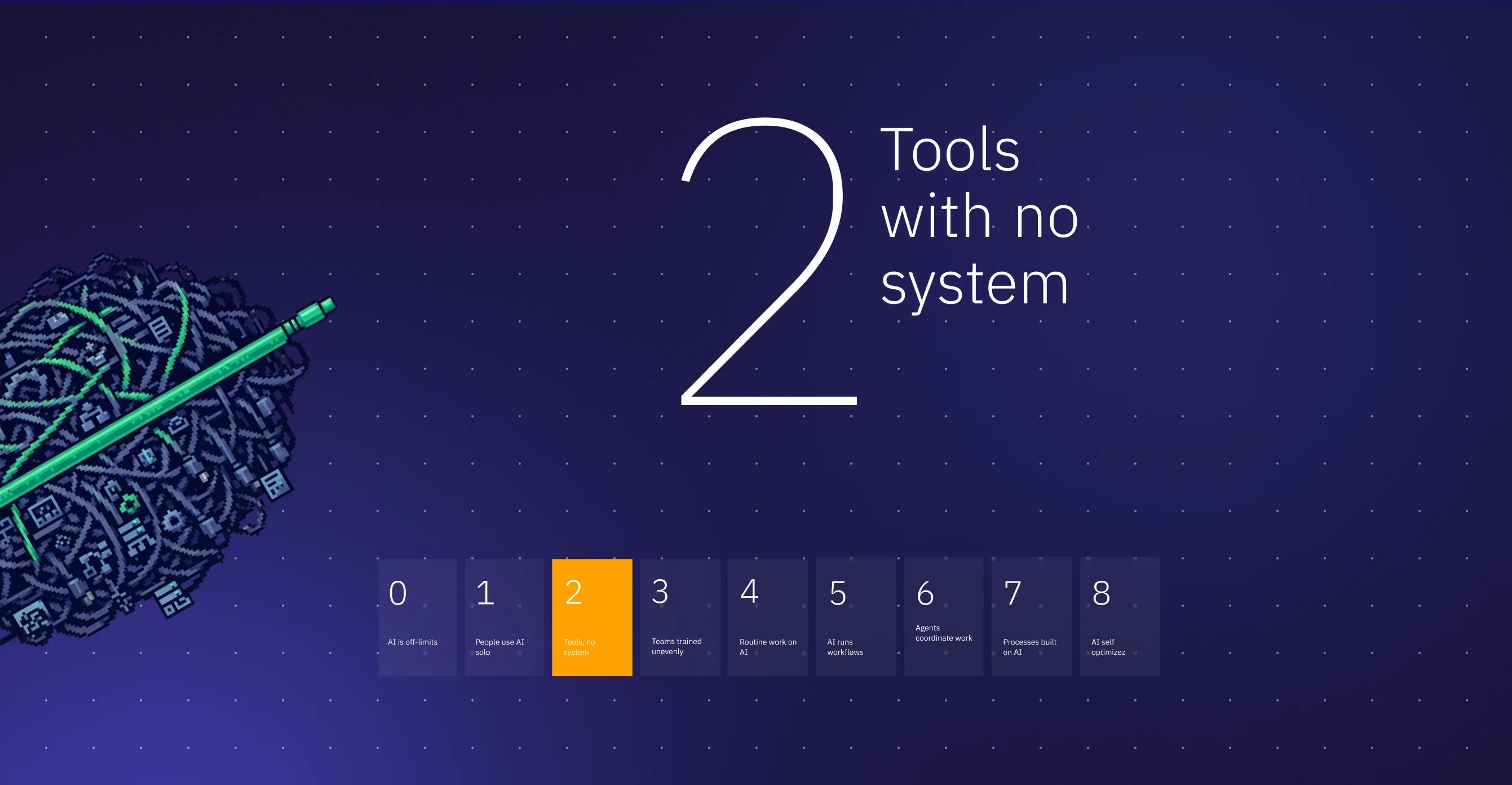
What AI sprawl is, why its return stays invisible, and four moves to control it with the people you have. Level 2 of the EBS AI-maturity ladder.
Article
Cross-industry
AI Consulting
6 min read
AI running on accounts that your company does not hold. This article explains what it is, how it spreads, and how to take it to the next level. (AI-maturity series lvl 1)
Article
Cross-industry
AI Consulting
Regulatory & Compliance
7 min read
Is AI overhyped? Yes, as a purchase promise. No, as what a prepared company can do with it. The evidence, and what the first step off level zero takes.

Article
FinTech
AI Consulting
Data Engineering & Analytics
Regulatory & Compliance
5 min read
AI in fintech is everywhere, yet few systems would survive an audit. Why projects stall, what regulators expect, and the three steps that fix it.

Article
Retail & eCommerce
Data Engineering & Analytics
AI Consulting
8 min read
Big Data is changing the retail industry. (internal expertise) Learn how businesses use data to make smarter decisions, create personalized experiences, and improve customer service with real examples of BigData applied to today’s fast-moving market.

Article
Retail & eCommerce
Business Analysis
AI Consulting
6 min read
How omnichannel strategies and AI-driven personalization help retailers connect online and in-store experiences, improve operations, and keep shoppers coming back.

Article
Retail & eCommerce
AI Consulting
Data Engineering & Analytics
6 min read
Find out how technology-driven personalization x AI creates closer relationships with customers.

Article
Retail & eCommerce
Data Engineering & Analytics
AI Consulting
6 min read
Reach customers wherever they shop with AI and real-time data. Discover how targeted marketing, a seamless online and offline shopping experience, and predictive analytics can personalize recommendations and boost sales. Our retail expert, Olga, shares practical insights and strategies to help you take your store digital. Read the full article for actionable tips and real-world examples.

Article
Cross-industry
AI Consulting
Process Automation
7 min read
From ELIZA to modern AI: explore chatbot evolution in customer service. Learn how 1.4 billion users benefit from automated support and instant query resolution.